 Website Development
Laravel Development in Hyderabad
Laravel Development in Hyderabad | HyderHub Web Services
Explore Laravel Development in HyderabadHyderHub develops React.js interfaces for Hyderabad businesses that need searchable dashboards, guided forms and connected customer journeys, with behaviour planned across devices and changing data states.
Make filters, forms and live data easier to navigate
Last updated October 27, 2026
HyderHub offers React.js development in Hyderabad for interactive dashboards, forms and customer interfaces. Discuss your frontend requirements and scope.
An attractive screen can still be difficult to use when filters, forms and data updates behave unpredictably.
Changing a filter clears the selection a visitor just made.
Planned interface state can retain agreed selections as results update.
A blank dashboard gives no explanation when information fails to load.
Scoped loading and error views can explain what users should do next.
Repeated form controls behave differently across your application screens.
Shared React components can apply consistent behaviour to recurring interactions.
Planning these transitions helps turn a collection of screens into a usable journey.
React is a library for building user interfaces from components. HyderHub can propose a frontend around the tasks your visitors need to complete, with clear decisions about navigation, data display and feedback. The right architecture depends on whether you need public pages, a signed-in application or both.
Consider a Hyderabad training provider whose visitors compare courses, filter schedules and complete an enquiry form. An illustrative React interface could preserve the selected course while the visitor changes dates, then explain missing form details without discarding their entries. Course records and enquiry processing would still need suitable data services.
Complex interfaces have many possible states: results may be loading, a search may return nothing, or a submission may need correction. If these states are left undefined, development decisions become inconsistent and customers may struggle to finish an otherwise simple task.
React can help organise this behaviour, but choosing a library does not resolve unclear requirements. Within a wider website development plan, first identify the user journey, the information it needs and the system responsible for saving it. This separates frontend work from backend changes and avoids assuming one automatically covers the other.
The intended benefits depend on the interactions selected for your project.
Select the required interface deliverables before confirming the development scope.
Visitors comparing products, courses or services need predictable filtering and clear result counts. Decide whether filters belong in shareable URLs, which selections should persist, and how the screen explains unavailable combinations. Large catalogues may require the server to perform searching and pagination.
A dashboard should make the next action visible rather than simply display charts. Agree how records are refreshed, what happens to stale information, and how users move from a summary to a detailed record. Account access must also be enforced by the backend.
Multi-step forms can collect information in a useful sequence when a single long form becomes difficult. Plan progress indicators, back navigation and submission recovery. Where a new data service is required, API development and integration can be discussed alongside the interface, with separate responsibilities for storage and business rules.
These decisions influence implementation, publishing and future maintenance requirements.
Ask to define acceptance in terms of tasks: a visitor can apply a filter, inspect a result and return without losing the agreed context. These checks make a proposal easier to review than broad promises about a modern frontend.
HyderHub's proposed approach centres on agreeing screen states, component responsibilities and integration boundaries before implementation. Review the exclusions too, including design revisions, content entry, backend repairs and post-launch changes. You can share your interface requirements with sample screens and the tasks users need to complete.
A local business interface may need legible contact details, relevant service information and forms that work comfortably on phones. A course enquiry tool, for example, should clarify the selected branch or delivery format where those options actually exist. Location labels should reflect your real operation.
Public service content needs a deliberate publishing and rendering plan so people and search systems can access it appropriately. Private dashboard content has different access requirements. React alone does not create local rankings, and adding Hyderabad locality names cannot substitute for accurate information, useful content and technical review.
Confirm the applicable handover items and ownership terms in your proposal.
Website Development
Laravel Development in Hyderabad | HyderHub Web Services
Explore Laravel Development in Hyderabad
Website Development
Node.js Development in Hyderabad | HyderHub Web Services
Explore Node.js Development in Hyderabad Website Development
Build a conversion-focused Shopify store with HyderHub Web Services in Hyderabad. Custom storefronts, theme setup, payments, apps and scalable eCommerce solutions.
Explore Shopify Development
Website Development
WooCommerce Development in Hyderabad | HyderHub Web Services
Explore WooCommerce Development
Website Development
PHP Website Development in Hyderabad | HyderHub Web Services
Explore PHP Website Development Website Development
Development of the interfaces, navigation and interactions that visitors use in their browser.
Explore Frontend DevelopmentUnderstand the stages, review points and handover before your project begins.
Clarify your goals, audience and requirements before agreeing the project scope.
Plan the structure, deliverables and dependencies so the project has a clear direction.
Review layouts and navigation before developing the main features.
Build the approved pages and features, with the integrations your project requires.
Check the agreed deliverables and key user journeys before sign-off.
Complete the handover and explain the support or maintenance included in your agreement.
Explore our website projects across industries and platforms. Open a project to see the design, content and features in use.
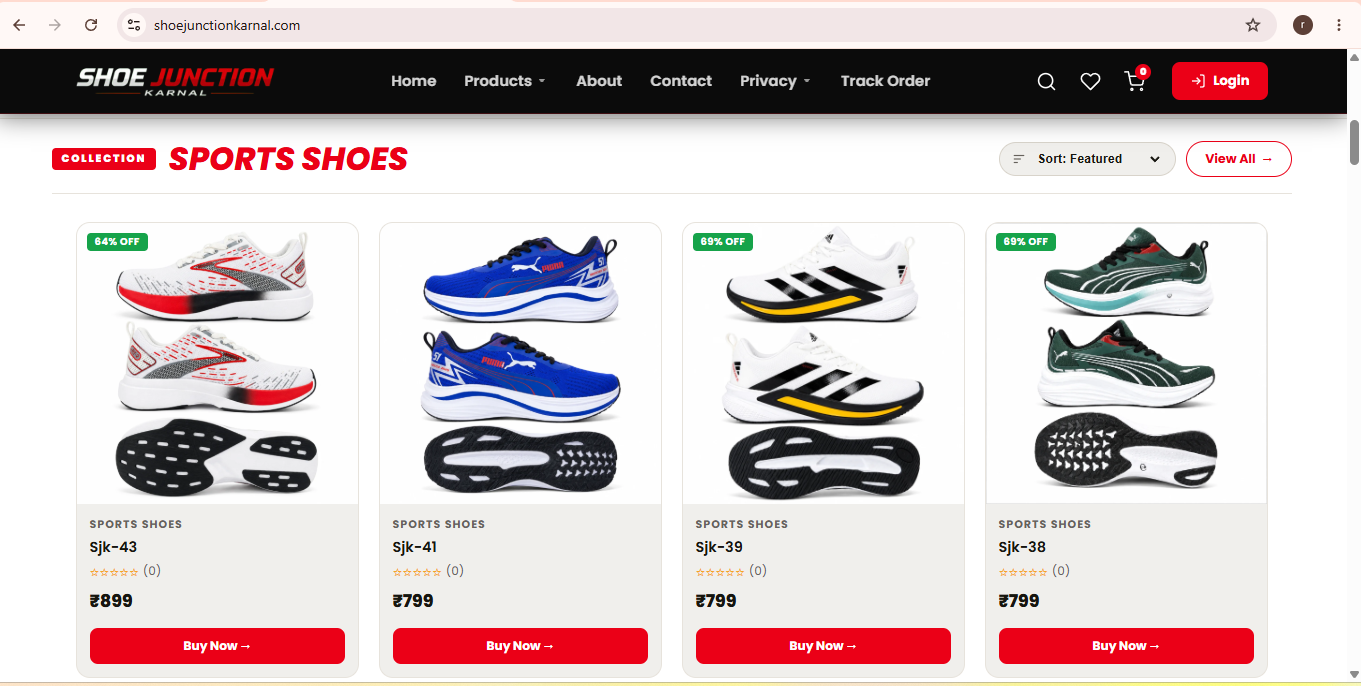
Full e-commerce store with Razorpay and Cashfree payments, Manual QR/UPI with screenshot upload, WhatsApp order flow, variant-level stock tracking, and a redesigned admin panel.
Visit website
Location-targeted healthcare website for a home nursing and elderly care provider in Nellore, with individual pages for home nursing, ICU care, post-surgery care, and physiotherapy, plus WhatsApp/click-to-call booking.
Visit website
Multi-service corporate website for an IT consulting and staffing company, with dedicated service pages, a technology-stack showcase, and an FAQ structure built for enterprise buyers.
Visit website
NGO website with Razorpay (India) and PayPal (international) donation integration, a program-wise photo/video gallery, and SEO content built around Jana Bhavitha's four pillars: Vidya, Arogya, Arthikam, and Sadhikaratha.
Visit website
Jana Bhavitha Charitable Trust is a non-profit organization in Kowtala, Telangana, dedicated to uplifting underserved communities through education, healthcare, financial empowerment, and social awareness.
Visit websiteLightweight, fast-loading personal portfolio website built for clarity and easy maintenance, with on-page SEO fundamentals for branded name searches.
Visit websitePersonal-brand website for a Hyderabad career counsellor, with life-stage-specific service pages (after 10th, after intermediate, after graduation, working professionals) built for local search.
Visit websiteServices website for a Tampa-based cloud, AI, and data engineering consultancy, structured for B2B lead generation with clear navigation between technology, services, and company pages.
Visit website
Enterprise-ready website for a US-based IT consulting firm offering cloud, cybersecurity, and healthcare IT services, with service-segmented landing pages built for B2B search visibility.
Visit website
Consulting-style business website covering software development, outsourcing, and digital transformation services, with structured sections for partners, technologies, and FAQs.
Visit websiteOur most chosen plan for growing local businesses.
For businesses that need more pages and custom functionality.
For larger businesses needing a fully custom PHP/MySQL build.
Not sure which plan fits your business? Use our free cost calculator for an instant estimate, or see full pricing details →
| Interface structure | Reusable components for recurring patterns | Separate implementations of repeated elements |
| Data feedback | Plan loading, empty and error states | Design around populated screens alone |
| Form journeys | Preserve entries and explain validation | Reset entries after rejected submissions |
| Search visibility | Choose rendering around public content needs | Leave content discovery until launch |
| Acceptance checks | Review interactions across agreed devices | Approve screenshots without task testing |
Personal-brand websites for consultants, coaches, and individual professionals.
church website designing in telangana hyderabad
Community-focused websites for churches and religious organizations.
Online stores built for real sales — product catalogs, payments, and order tracking.
Admission-ready websites with course listings for schools, coaching centres, and career counsellors.
Patient-friendly websites with appointment booking for clinics, nursing services, and healthcare providers.
Corporate-credible websites and service pages for IT firms, consultancies, and B2B service providers.
Corporate websites for IT consulting, staffing, and technology service firms.
test
Donation-ready websites for trusts and non-profits, built for donor trust and multi-program storytelling.
Donation-ready websites with program showcases for trusts, NGOs, and charitable organisations.
Gallery and WhatsApp-ordering websites with local SEO for restaurants, retail stores, and local brands.
Admission-focused websites for schools, colleges, and coaching institutes.
Booking-ready websites for travel agencies and tour operators.
HyderHub Web Services provides professional website design services across Hyderabad — including responsive website development, ecommerce websites, SEO-friendly business websites, and modern web design solutions for startups and local businesses.
Fill in your details and get an instant, personalised response straight to your WhatsApp — no waiting, no spam.
We shortlisted three agencies and ultimately chose HyderHub as our website design agency in Hyderabad — and we were not disappointed. Our coaching academy needed a website that would appeal to students and parents equally. The team built a clear, structured site with course details, faculty profiles, success stories, and an online
Yes, selected interactive areas can use React without replacing every page. The existing platform, scripts and publishing process need review first so the new components have a clear place to load and receive data. A focused feature such as a product selector may need less disruption than a full frontend replacement, but compatibility checks still form part of the scope.
A finished design is helpful but the starting point can be agreed. Existing brand guidance, wireframes or examples may support an initial design phase. Development should cover more than the ideal desktop screen: loading states, errors, mobile layouts and keyboard behaviour also need decisions. Separate design creation from implementation in the proposal so review rounds and responsibilities are clear.
A React interface can connect to a suitable existing backend through supported data access methods. Review available endpoints, authentication, response formats and the operations users need. An interface cannot reliably supply missing server capabilities on its own. Backend development may be needed where business rules, permissions or data services require changes.
No, performance depends on the implementation, data requests, assets, hosting and the devices visitors use. Unnecessary scripts or slow APIs can still cause delays. Agree representative pages and measurable loading or interaction checks before optimisation work. Results should be assessed against that baseline rather than inferred from the choice of React or a particular framework.
Public pages need a rendering strategy that suits their content, alongside meaningful URLs, page metadata, internal links and accessible information. React-based frameworks offer different rendering options, so the approach should follow the publishing requirements. Indexing and rankings remain outside a development guarantee. Private account screens should have separate access and discovery decisions rather than being treated as public landing pages.
Entry preservation can be designed for agreed failure scenarios. The interface might retain inputs after a validation error, explain an unavailable service and offer a safe retry. Behaviour after a browser refresh, closed tab or expired session needs separate decisions, especially for sensitive information. The backend must also handle repeated submissions appropriately where duplicate records would cause problems.
React web development covers browser interfaces unless another platform is explicitly agreed. A responsive website can adapt to phone screens, but a native mobile application is a separate deliverable. Offline access, installation prompts and notifications also need assessment. If browser-based installation is relevant, progressive web app development can be explored as a distinct scope.
The review should use an agreed list of browsers, devices and accessibility checks. Relevant tasks include reaching controls by keyboard, seeing focus, understanding form labels and reading error messages. Automated checks can assist but do not replace reviewing actual journeys. A formal accessibility audit, assistive technology coverage or a conformance target should be specified separately rather than assumed.
Handover should identify the source files, repository permissions and build instructions covered by your agreement. Clarify ownership of hosting, domain and third-party accounts, together with any component licence restrictions. The documentation should explain configuration names and release steps while keeping actual secrets in approved account settings. Content editing tools are included only if they have been specified.
Content changes depend on the editing setup you choose. A connected CMS may allow authorised staff to update defined fields, while structural interface changes usually need development. Agree responsibility for dependency updates, regression checks and production releases after launch. Maintenance and bug fixing can be discussed separately, with its coverage and commercial terms confirmed.

 Web Design
Looking for a reliable website designer near Begumpet? Here's what actually matters when comparing local optio…
Read More Web Design
Trying to decide between a freelance website designer and a full agency? Here's an honest breakdown of the tra…
Read More Web Design
Wondering what a church website actually costs in Hyderabad? Here's a straightforward breakdown of pricing, fe…
Read More